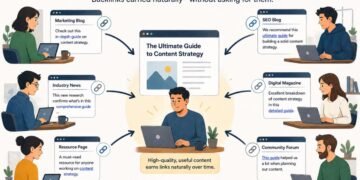

When someone finds an article on your website helpful, they may link to it so their readers can find it too. Sometimes they’ll send you a message saying, “I included a link to your article in mine.” But not everyone will let you know. So how do you find the other websites that have linked to you?
You could start looking for them one by one, but you wouldn’t know where to look next or which ones you had missed. That’s where a backlink tool comes in. It keeps a record of links it finds on the web, which you can search to see who has linked to your website.
Then you try a second tool and notice something odd: the first reports 500 backlinks, while the second shows 700. You might even find a link yourself, click it, and wonder why neither report includes it.
To make sense of those differences, let’s look at how a link gets from a webpage into a backlink report.
First, the Tool Has to Find the Page
The writer’s article may be online, but a backlink tool doesn’t automatically learn about it when it is published. It needs to discover the page containing the link to your website.
Tools do this with software called a crawler. A crawler visits webpages and reads the links it can find there. Those links can lead it to other pages, where it may find more links to follow.
For example, it might visit a blog’s homepage, follow a link to its latest article, and find your website mentioned there. The link from that article to your website is your backlink.
Links between pages on the same website are called internal links. Links leading to another website are external links. Both can give a crawler routes to pages it hasn’t visited before. A page with few discoverable links pointing to it may be harder to find.
Each platform makes its own crawling decisions. One may already have visited the writer’s article, while another hasn’t reached it yet. At this stage, the difference between the reports starts with the pages each tool has found.
Knowing About a Page Is Not the Same as Seeing Its Latest Version
Suppose the writer published the article on Monday but added the link to your website on Wednesday.
If a crawler visited on Tuesday, it saw an article without your backlink. It needs to return before it can discover the addition. Another tool that visits on Thursday may find the link straight away.
This return visit is called a recrawl. It matters for removed links too: if the writer later deletes your link, a tool may continue showing its older record until it checks the article again.
A discovery date in a report therefore isn’t necessarily the date the writer added the link. It may tell you when the tool first found or recorded it.
Why Doesn’t the Tool Just Check Every Page Again?
Every visit takes resources. A crawler needs to request a page, receive its contents, extract information, and arrange another visit later. Doing that across a large part of the web means choosing which pages to check and how often.
Ahrefs, for example, explains that pages are not all crawled at the same frequency, and finding a new backlink can take days or weeks. That is an explanation of its own process, not a deadline that applies to every tool or every link.
A frequently updated database also does not mean every page in it was checked recently. New information can be added regularly while individual pages wait longer for their next visit.
Some Pages Are Hard to Access or Process
Waiting is not always the answer. A crawler might know the article’s address but be unable to read it successfully.
The website could block that particular crawler, or its server might fail to respond during the visit. In other cases, the page may show a working link to a visitor in a way the tool does not extract or store.
This is why opening a page in your browser and clicking the link does not prove that every backlink tool can collect it. Your browser and the tool’s crawler are not necessarily accessing and reading the page in the same way.
Some limitations are temporary; others may prevent the backlink from entering that particular database at all. Ahrefs documents both crawler-access restrictions and choices about which kinds of links it stores. Other platforms have their own capabilities and rules.
Finding a Link and Showing It in a Report Are Separate Steps
Once the crawler finds the backlink, the platform still needs to process the information and make it available in its reports. Discovery and display do not have to happen at the same moment.
There are also decisions about how to organize the records. A page may have duplicate versions, or an old address may forward visitors to a new one. Tools can handle those situations differently rather than counting every address as a separate, unrelated page.
You may encounter the term canonical URL here. It means the preferred address for a page when more than one version exists. How a platform groups those versions, handles forwarded addresses, or combines repeated links can affect the figures you see.
Report settings add another layer. A filtered report might exclude links that are present in the database, and a grouped view may show fewer entries than a more detailed view. Before treating two totals as a disagreement, check that you have selected the same website or page and comparable reporting options.
Current Links and Historical Records Answer Different Questions
Suppose the writer linked to you last year but has since removed the reference. A report showing historical records may still include that backlink, while a report limited to links last confirmed as present may not.
The historical record can help you understand past coverage. The more current view helps you investigate what the tool most recently found. Neither should be mistaken for a continuous live check of the article.
For the same reason, a jump in the reported total does not necessarily mean that many links were added online that day. The tool might have discovered older pages or updated records it already held.
How to Use Reports That Don’t Match
Start with the question you want the data to answer.
If you are following changes over several months, keep the tool, target, and report settings consistent. Switching databases midway can make a difference in coverage look like growth or decline.
Two tools can also disagree on totals while showing a similar pattern. One might report 500 backlinks and another 700, yet both show an increasing number of websites linking to you. Those separate websites are called referring domains. Looking at their direction over time can be useful even when the totals differ, although agreement between tools is not proof that either has found every link.
For an individual missing backlink, begin with the actual article. Check whether the link is still there and whether it leads to the expected page. Then review your report’s filters, any available crawl dates, and the tool’s documented limitations. Another database may provide additional information if it has reached the article more recently.
The larger total alone does not identify the better tool. For tracking recent mentions, discovery speed may matter most to you. For researching older references, historical records may be more useful. The value of the report depends on what you need to learn from it.
Does a Missing Backlink Mean Google Hasn’t Found It?
No conclusion about Google follows from that report alone.
A third-party backlink tool and Google use separate crawling systems. A link missing from your chosen tool may still have been discovered by Google. Equally, seeing it in the tool does not establish how Google evaluates it or whether it affects rankings.
Keep the observation as specific as the evidence allows: the link is present on the article, but this report is not showing it. That gives you something concrete to investigate without assuming the backlink is broken or has no value.