You’re reading an article about making bread when you come across a link that says “easy sourdough recipe.” Clicking those words takes you to the recipe. The clickable words are called anchor text, and they give you a clue about what you’ll find before you open the link.
Another article could link to that same recipe using the cooking website’s name, the words “read more,” or the page’s web address. The destination stays the same, but the way the link is presented changes.
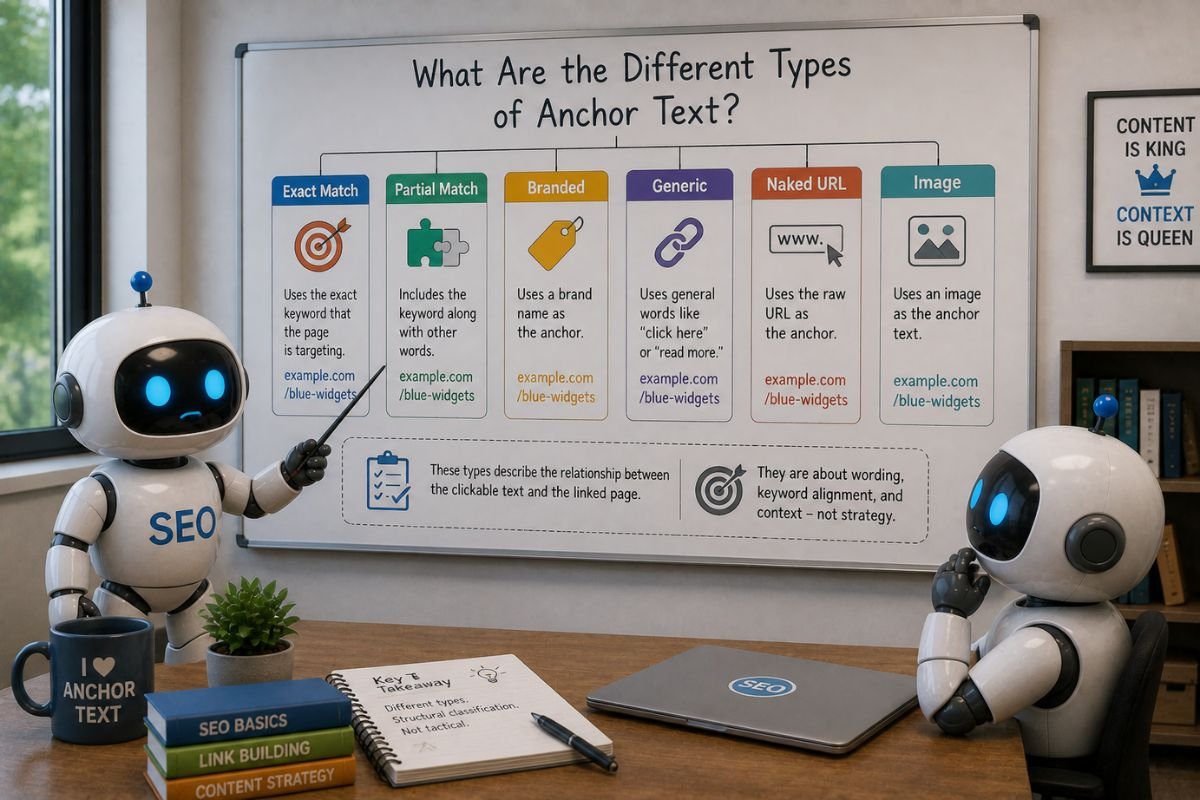
These differences are the basis of anchor text types. A website’s name is a branded anchor, while wording such as “read more” is a generic anchor. Other labels describe how closely the clickable words match a particular phrase, or whether the link uses an image instead of visible text.
To understand “match,” you first need something to compare the anchor against. Suppose the recipe page is written for people searching for “easy sourdough recipe.” That search phrase is the keyword we will use for these examples.
Exact match
An anchor that says “easy sourdough recipe” repeats the keyword word for word. That makes it an exact-match anchor relative to this keyword.
Matching the subject is not enough. “Simple instructions for baking a sourdough loaf” might describe the same recipe, but it does not repeat the same words.
The comparison phrase matters, too. “Sourdough recipe” is an exact match for the keyword “sourdough recipe,” but it is only part of “easy sourdough recipe.” Without knowing which phrase someone is comparing it with, you cannot reliably interpret the label.
Partial match
Now change the anchor to “try this easy sourdough recipe.” It still contains the keyword, but it adds words. Another version, “sourdough recipe for beginners,” retains part of the phrase while changing the rest.
These are examples of partial-match wording. SEO resources vary in how broadly they use the term: some include close variations and related phrases. Here, partial match means that meaningful words from the comparison phrase remain, without the entire anchor being identical to it. Simply sharing an unrelated or common word is not enough to establish a meaningful partial match.
Related or semantic wording
An anchor can describe the same subject using different language. “A simple guide to baking your first fermented loaf,” for example, could refer to our sourdough recipe without repeating its keyword.
This is sometimes called related or semantic anchor text. “Semantic” refers to meaning: the connection comes from what the words describe rather than an exact word-for-word match. These labels are useful descriptions, not a single classification system followed by every SEO resource.
You may also come across the term “LSI anchor text.” LSI stands for Latent Semantic Indexing, but in SEO discussions, the term is often used to describe anchors that use related wording instead of repeating an exact keyword. Google’s public link guidance does not identify LSI anchor text as a separate category or recommend a special optimization method for it. “Related wording” is a clearer description.
Brand names and brand-plus-description anchors
Imagine the recipe appears on a fictional cooking website called Hearth & Crumb. A link that says “Hearth & Crumb” names the website, making it a branded anchor. Brand names can identify companies, publications, or organizations as well.
Both “Hearth & Crumb” and “easy sourdough recipe” could link to that same recipe page. One names the source; the other repeats our comparison keyword. The destination alone does not determine the anchor type.
“Hearth & Crumb’s easy sourdough recipe” combines the brand with a description of its resource. This is often called compound anchor text or brand-plus-keyword anchor text. Here, “compound” describes this combination, rather than a separate technical link format.
Visible web addresses and generic wording
Naked URL anchors
When the clickable text displays a web address, it is commonly called a naked URL anchor. For example, an address shown as https://example.com/recipes/sourdough/ uses the URL itself instead of a phrase such as “sourdough recipe.”
The domain identifies the website, while readable words after it can suggest the particular page. An address ending in “/recipes/sourdough/” offers more clues than one ending in an unexplained string of numbers.
A domain may contain a brand name, but the visible format is still a web address. It also contains readable text, so a naked URL is different from a link with no visible words.
Generic anchors
Wording such as “read more,” “click here,” or “this page” does not identify a specific destination on its own. “Read more” could lead to a recipe, a news story, or a product review.
The surrounding sentence may explain where the link leads, but the clickable words alone remain vague. This can be especially confusing for someone using a screen reader to browse links separately from the surrounding text.
Longer phrases and source references
Some labels describe more than whether the anchor contains a keyword or brand name.
Long-tail anchor text
Compare “bread baking” with “how to bake sourdough bread without a Dutch oven.” The second phrase describes a narrower subject in more detail. Longer, more specific anchor phrases like this are sometimes called long-tail anchors.
There is no fixed word count that defines this label. Adding “click here now to read more about” makes an anchor longer without making its subject more specific. Long-tail wording concerns the detail in the phrase, while exact and partial match concern its relationship to a chosen keyword.
Citation anchor text
Suppose an article reports a research finding and links the words “Pew Research Center” to the study supporting it. The link allows the reader to examine the source behind the statement.
That use can be described as citation anchor text. The citation label describes the link’s role as a reference. The clickable wording might be the organization’s name, the report’s title, or a descriptive phrase.
One anchor can fit more than one label
The research link above is both branded and a citation: it names the organization and points to evidence. Similarly, a phrase containing a brand and a detailed description can be both compound and long-tail.
These labels answer different questions about the same link. They are not necessarily separate boxes into which every anchor fits only once.
Image links, icons, and empty anchor text
A photograph of bread may simply illustrate a page. If clicking it opens the recipe, the photograph is also part of a link. The image is what visitors click, even though no ordinary anchor words may appear beside it.
Alt text in an image link
Images can have a written alternative, called alt text. This can provide information for people who cannot see the image. Google explains that it uses an image’s alt text as anchor text when the image is a link.
For a linked image, the description needs to account for what the link does. A logo leading to a homepage, for instance, can have a text alternative that identifies the site and its homepage rather than merely saying “logo.” W3C’s guidance on functional images distinguishes this purpose from describing only the picture’s appearance.
No visible words does not always mean no description
An icon may have no written label on screen yet still have an accessible name: text that assistive technology can use to identify the link. That name may come from an image’s alternative text or another labeling method in the page’s code.
There is a similar qualification for empty alt text. A logo and the words naming its destination may sit inside the same link. If the image adds no information beyond those words, its alt text can be empty to avoid repeating them. The link still has text describing it.
A link with no useful text alternative or other accessible name is a different case: a person who cannot see its image or recognize its icon may have difficulty knowing where it leads. “Empty anchor text” therefore needs a closer look than simply checking whether ordinary words are visible.
What an anchor type can tell you
A type label helps describe a link’s wording, presentation, or purpose. It does not tell you why the link was created or how Google will rank the destination.
Exact-match words can be an ordinary description of a page. A brand name does not establish that a link is trustworthy. Google’s link-spam policy concerns links created primarily to manipulate rankings. Identifying those practices requires evidence about how the links were created, beyond the wording of an individual anchor.